

728x90
오늘 내가 배운 것
1. 틱택토 게임 만들기
1. TicTacToe(틱택토) 게임 만들기
React 공식 홈페이지 내 자습서에 나와 있는 코드를 그대로 따라 치면
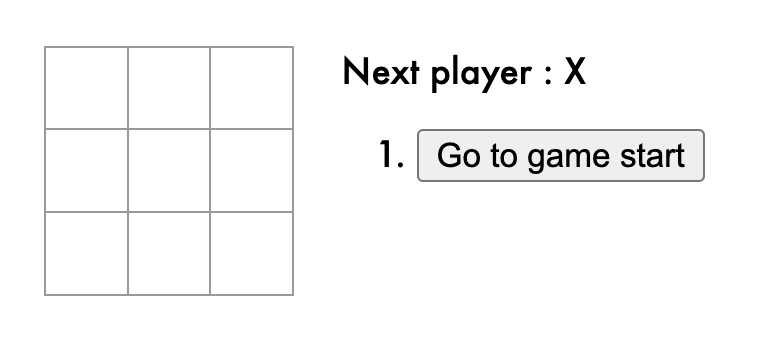
다음과 같은 결과가 나온다.
동영상 서비스가 종료되어 해당 콘텐츠를 재생할 수 없습니다.
히스토리까지 저장을 해서 되돌리기도 가능하다.
1번 코드 확인하기
더보기
HTML
<!DOCTYPE html>
<html lang="en">
    <head>
        <meta charset="UTF-8" />
        <meta http-equiv="X-UA-Compatible" content="IE=edge" />
        <meta name="viewport" content="width=device-width, initial-scale=1.0" />
        <script crossorigin src="https://unpkg.com/react@18/umd/react.development.js"></script>
        <script crossorigin src="https://unpkg.com/react-dom@18/umd/react-dom.development.js"></script>
        <script src="https://unpkg.com/@babel/standalone/babel.min.js"></script>
        <link rel="stylesheet" href="tictactoe.css" />
        <title>Document</title>
    </head>
    <body>
        <div id="errors" style="background: #c00; color: #fff; display: none; margin: -20px -20px 20px; padding: 20px; white-space: pre-wrap"></div>
        <div id="root"></div>
        <script type="text/javascript">
            window.addEventListener("mousedown", (e) => {
                document.body.classList.add("mouse-navigation")
                document.body.classList.remove("kbd-navigation")
            })
            window.addEventListener("keydown", (e) => {
                if (e.keyCode === 9) {
                    document.body.classList.add("mouse-navigation")
                    document.body.classList.remove("kbd-navigation")
                }
            })
            window.addEventListener("click", (e) => {
                if (e.target.tagName === "A" && e.target.getAttribute("href") === "#") {
                    e.preventDefault()
                }
            })
            window.onerror = (message, source, line, col, error) => {
                let text = error ? error.stack || error : message + " (at " + source + " : " + line + " : " + col + " ) "
                errors.textContent += text + "\n"
                errors.style.display = ""
            }
            console.error = (function (old) {
                return (error = () => {
                    errors.textContent += Array.prototype.slice.call(arguments).join(" ") + "\n"
                    errors.style.display = ""
                    old.apply(this, arguments)
                })
            })(console.error)
        </script>
        <script src="tictactoe.js" type="text/babel"></script>
    </body>
</html>
CSS
body {
    font: 14px "Century Gothic", Futura, sans-serif;
    margin: 20px;
}

ol,
ul {
    padding-left: 30px;
}

.board-row:after {
    clear: both;
    content: "";
    display: table;
}

.status {
    margin-bottom: 10px;
}

.square {
    background: #fff;
    border: 1px solid #999;
    float: left;
    font-size: 24px;
    font-weight: bold;
    line-height: 34px;
    height: 34px;
    margin-right: -1px;
    margin-top: -1px;
    padding: 0;
    text-align: center;
    width: 34px;
}

.square:focus {
    outline: none;
}

.kbd-navigation .square:focus {
    background: #ddd;
}

.game {
    display: flex;
    flex-direction: row;
}

.game-info {
    margin-left: 20px;
}
JavaScript
const Square = (props) => {
    console.log(props)
    return (
        <button className="square" onClick={props.onClick}>
            {props.value}
        </button>
    )
}
class Board extends React.Component {
    renderSquare(i) {
        return <Square value={this.props.squares[i]} onClick={() => this.props.onClick(i)} />
    }
    render() {
        return (
            <div>
                <div className="board-row">
                    {this.renderSquare(0)}
                    {this.renderSquare(1)}
                    {this.renderSquare(2)}
                </div>
                <div className="board-row">
                    {this.renderSquare(3)}
                    {this.renderSquare(4)}
                    {this.renderSquare(5)}
                </div>
                <div className="board-row">
                    {this.renderSquare(6)}
                    {this.renderSquare(7)}
                    {this.renderSquare(8)}
                </div>
            </div>
        )
    }
}
class Game extends React.Component {
    constructor(props) {
        super(props)
        this.state = {
            history: [
                {
                    squares: new Array(9).fill(null),
                },
            ],
            xIsNext: true,
            stepNumber: 0,
        }
    }
    handleClick(i) {
        const history = this.state.history.slice(0, this.state.stepNumber + 1)
        const current = history[history.length - 1]
        const squares = current.squares.slice()
        if (calculateWinner(squares) || squares[i]) {
            return
        }
        squares[i] = this.state.xIsNext ? "X" : "O"
        this.setState({
            history: history.concat([
                {
                    squares: squares,
                },
            ]),
            xIsNext: !this.state.xIsNext,
            stepNumber: history.length,
        })
    }
    jumpTo(step) {
        this.setState({
            stepNumber: step,
            xIsNext: step % 2 === 0,
        })
    }
    render() {
        const history = this.state.history
        const current = history[this.state.stepNumber]
        const winner = calculateWinner(current.squares)
        const moves = history.map((step, move) => {
            const desc = move ? "Go to move #" + move : "Go to game start"
            return (
                <li key={move}>
                    <button onClick={() => this.jumpTo(move)}>{desc}</button>
                </li>
            )
        })
        let status
        if (winner) {
            status = "Winner : " + winner
        } else {
            status = "Next player : " + (this.state.xIsNext ? "X" : "O")
        }
        return (
            <div className="game">
                <div className="game-board">
                    <Board squares={current.squares} onClick={(i) => this.handleClick(i)} />
                </div>
                <div className="game-info">
                    <div>{status}</div>
                    <ol>{moves}</ol>
                </div>
            </div>
        )
    }
}
// ========================================
const root = ReactDOM.createRoot(document.querySelector("#root"))
root.render(<Game />)
function calculateWinner(squares) {
    const lines = [
        [0, 1, 2],
        [3, 4, 5],
        [6, 7, 8],
        [0, 3, 6],
        [1, 4, 7],
        [2, 5, 8],
        [0, 4, 8],
        [2, 4, 6],
    ]
    for (let i = 0; i < lines.length; i++) {
        const [a, b, c] = lines[i]
        if (squares[a] && squares[a] === squares[b] && squares[a] === squares[c]) {
            return squares[a]
        }
    }
    return null
}
2. 직접 구현해 보기
공식문서에 나온 코드랑 평소에 작성하는 스타일이랑 다르다 보니 내가 원하는 스타일대로 작성해 봤다.
결국 일부분만 바뀐 것이긴 하지만 더 기억에 남게 하기 위해서 직접 생각하면서 코드를 짜봤다.
(히스토리는 구현 못함..)
동영상 서비스가 종료되어 해당 콘텐츠를 재생할 수 없습니다.
2번 코드 확인하기 (javascript 파일만 / html, css는 1번과 동일)
더보기
class Square extends React.Component {
    constructor(props) {
        super(props)
    }
    render() {
        return (
            <button className="square" onClick={this.props.onClick}>
                {this.props.value}
            </button>
        )
    }
}

class Board extends React.Component {
    constructor(props) {
        super(props)
        console.log(this.props)
    }
    renderSquare(i) {
        return <Square value={this.props.squarse[i]} onClick={() => this.props.onClick(i)} />
    }
    render() {
        return (
            <div>
                <div className="board-row">
                    {this.renderSquare(0)}
                    {this.renderSquare(1)}
                    {this.renderSquare(2)}
                </div>
                <div className="board-row">
                    {this.renderSquare(3)}
                    {this.renderSquare(4)}
                    {this.renderSquare(5)}
                </div>
                <div className="board-row">
                    {this.renderSquare(6)}
                    {this.renderSquare(7)}
                    {this.renderSquare(8)}
                </div>
            </div>
        )
    }
}
class Game extends React.Component {
    constructor(props) {
        super(props)
        this.state = {
            squarse: new Array(9).fill(null),
            xIsNext: true,
        }
    }
    handleClick(i) {
        const square = this.state.squarse
        const square2 = [...square]
        if (square2[i]) return
        square2[i] = this.state.xIsNext ? "X" : "O"
        this.setState({
            squarse: square2,
            xIsNext: !this.state.xIsNext,
        })
    }

    render() {
        const winner = winners(this.state.squarse)
        console.log(winner)
        let status
        if (winner) {
            status = `Winner : ${winner} `
        } else {
            status = `Next player : ${this.state.xIsNext ? "X" : "O"}`
        }
        return (
            <div className="game">
                <div className="game-board">
                    <Board squarse={this.state.squarse} onClick={(i) => this.handleClick(i)} />
                </div>
                <div className="game-info">{status}</div>
            </div>
        )
    }
}
function winners(squares) {
    const lines = [
        [0, 1, 2],
        [3, 4, 5],
        [6, 7, 8],
        [0, 4, 8],
        [2, 4, 6],
        [0, 3, 6],
        [1, 4, 7],
        [2, 5, 8],
    ]
    for (let v of lines) {
        console.log(v)
        const [a, b, c] = v
        if (squares[a] && squares[a] === squares[b] && squares[a] === squares[c]) {
            return squares[a]
        }
    }
    return null
}
const root = ReactDOM.createRoot(document.querySelector("#root"))
root.render(<Game />)
반응형
'시작 > TIL(Today I Learned)' 카테고리의 다른 글
| 230227 - Webpack ( 웹팩 ) (0) | 2023.02.28 |
|---|---|
| 230227 - Babel ( 바벨 ) (1) | 2023.02.27 |
| 230223 - React this 바인딩, Counter 만들기, list 만들기 (0) | 2023.02.23 |
| 230222 - React Comment 만들기 (0) | 2023.02.22 |
| 230221 - React (리액트) 기초 (0) | 2023.02.21 |